Booost: AI LinkedIn Comments & LinkedIn Automation for Growth Teams

Booost is a LinkedIn growth platform with two products. Booost Personal is a Chrome extension that writes AI-powered LinkedIn comments in the user's natural tone, in any language, using the user's own AI provider key. Booost Business is a desktop application for growth teams and agencies: a six-axis contact intelligence radar, a visual workflow builder for outreach automation, an editorial content pipeline, an AI inbox, 20 AI providers (bring your own key), and an anti-ban safety system with dynamic trust scoring, a circuit breaker, and graduated warm-up progression. All campaign and contact data is stored locally in a SQLite database. The app is audited against WCAG 2.2 AA on every release.

One network. Two ways to work it.

Chrome extension

Personal

AI comments in your voice, one click per post. For people building their own network.

Desktop app

Business

Contact intelligence, outreach and content for teams that run LinkedIn accounts for a living.
Booost logo
Chrome extension

Comments people
actually answer.

Install the Chrome extension, plug in your AI key, and get a context-aware comment in your tone for any post. One click, any language.

How it works

1

Install & connect

Add the Chrome extension and enter your preferred AI provider’s API key.

2

Browse LinkedIn

Open any LinkedIn post. Booost reads the full context — topic, tone, and language.

3

One-click comment

Hit the Booost button. A relevant, on-brand comment appears — edit or post instantly.

What you get

AI comments that sound like you

Booost Personal writes context-aware LinkedIn comments in your natural tone. The AI reads the full post first, so every response is genuinely relevant instead of a generic “Great post!”. You sound like yourself, just faster.

Comment in any language

Booost adapts to your audience’s language natively: accurate tone and idioms, not word-for-word translation. Engage international connections without switching tools.

Consistency compounds

Strategic commenting puts you in front of your audience where they already spend their time. Booost removes the friction: ten thoughtful comments take minutes, not an hour, so showing up every day actually happens.

20
AI providers, your key
1-click
Generate & post
100%
Your voice, your words
Pricing

Plans for every stage

Start with effortless comments, scale up to full network intelligence. AI generation runs on the provider key you configure.

Starter€19/month

Unlimited AI comments, advanced professional context

Growth€49/month

Warm Reach Map (10 targets/month), AI bridge comments, network insights

Scale€79/month

Unlimited targets, advanced insights, follow-up tracking

Intelligence€149/month

Relational map, cluster detection, trend engine, weekly reports

Black€249/month

Everything in Intelligence plus sentiment, export API, SLA, 1:1 onboarding

Launching soon. Waitlist members get first access.

Join the waitlist

Frequently asked questions

What is Booost Personal?

Booost Personal is a Chrome extension that generates AI-powered LinkedIn comments in your natural tone and writing style. Install it, choose your preferred AI provider, and start engaging with posts in one click. It supports multiple languages and adapts to each post’s context automatically.

How does Booost Personal generate comments?

Booost Personal reads the full post text, analyzes its context and topic, then generates a relevant comment using your chosen AI provider. You can select from 20 providers including Anthropic (Claude), OpenAI-compatible endpoints, and Ollama for local processing. The AI adapts its tone to match your writing style, so comments sound authentically like you.

How much does Booost Personal cost?

Booost Personal has five plans: Starter at €19/month (unlimited AI comments), Growth at €49, Scale at €79, Intelligence at €149 and Black at €249/month with the full network-intelligence suite, export API and 1:1 onboarding. AI generation uses the provider key you configure.

Which AI provider should I choose?

It depends on your priorities. Anthropic’s Claude models lead on comment quality. Groq, Cerebras and Together AI are fast and cheap for high volume. Ollama runs a local model, so nothing leaves your machine. You can switch providers at any time without losing your settings.

Can LinkedIn detect Booost Personal?

Booost Personal is a Chrome extension that helps you write comments — it does not automate any LinkedIn actions. You review and post every comment yourself. From LinkedIn’s perspective, you are simply typing a comment and clicking Post, which is normal user behavior.

Get early access

Be the first to know when we launch.

Early adopters get priority access and a say in the roadmap.

Booost logo
Desktop app · Windows · macOS · Linux

Your LinkedIn growth,
run from one desktop.

AI contact intelligence, visual outreach automation and an editorial content pipeline in one desktop app, behind an anti-ban system that knows when to stop.

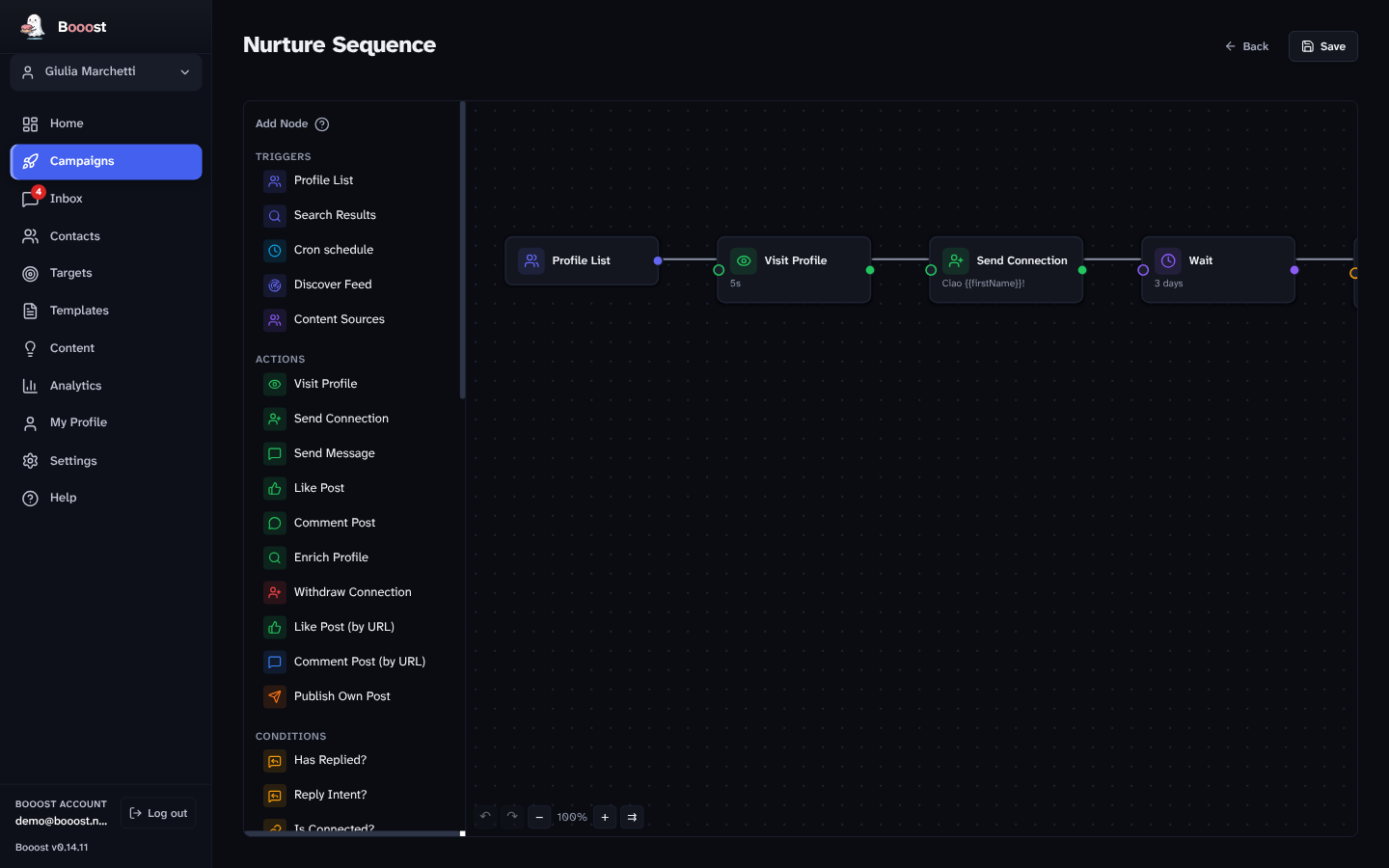
Booost visual workflow builder
6-axisContact radar
20AI providers, BYOK
100%Local-first data
Anti-banSafety system
AAWCAG 2.2 accessibility
Who it's for

Built for the teams that grow on LinkedIn

One desktop, every account your team runs — with the controls a brand actually needs.

Agencies

Run every client's outreach and content from one place. Local-first, so client data never leaves the machine.

Exec & marketing teams

Grow the personal brands of all your C-levels at once — in each leader's voice, every post approved before it ships.

Founders

Build in public without living in LinkedIn. Find the right people, draft in your voice, stay safe.

The machine

One control room for the whole operation

From finding the right people to publishing the post that pulls them in, in one desktop app.

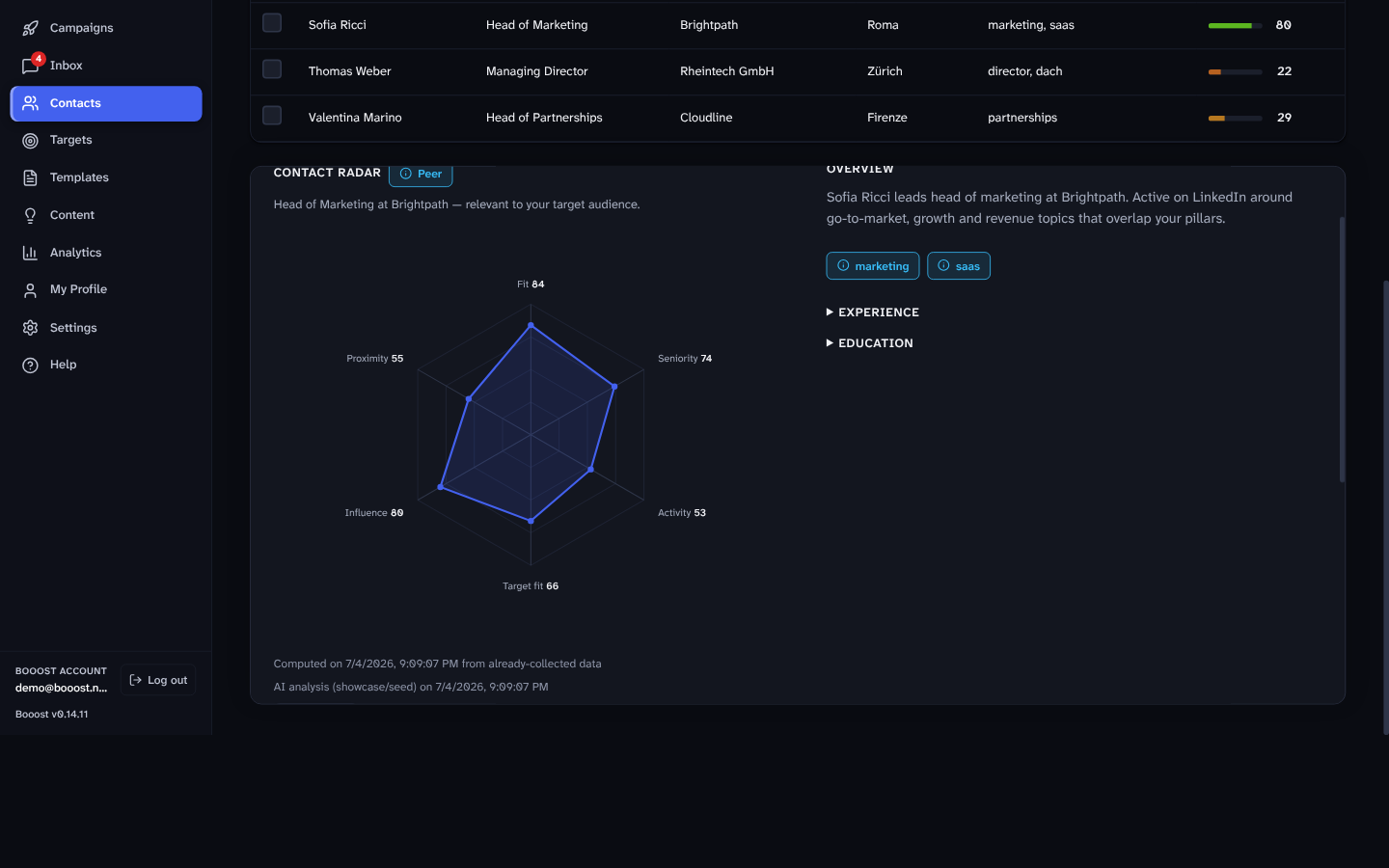
Contact intelligence

Know who's actually worth your time

A six-axis radar scores every contact — Fit, Seniority, Activity, Target fit, Influence and Proximity — and shows the evidence behind each number. The AI judges how well someone matches the audience you defined, so your effort lands where it counts.

Six-axis contact intelligence radar
Your pipeline

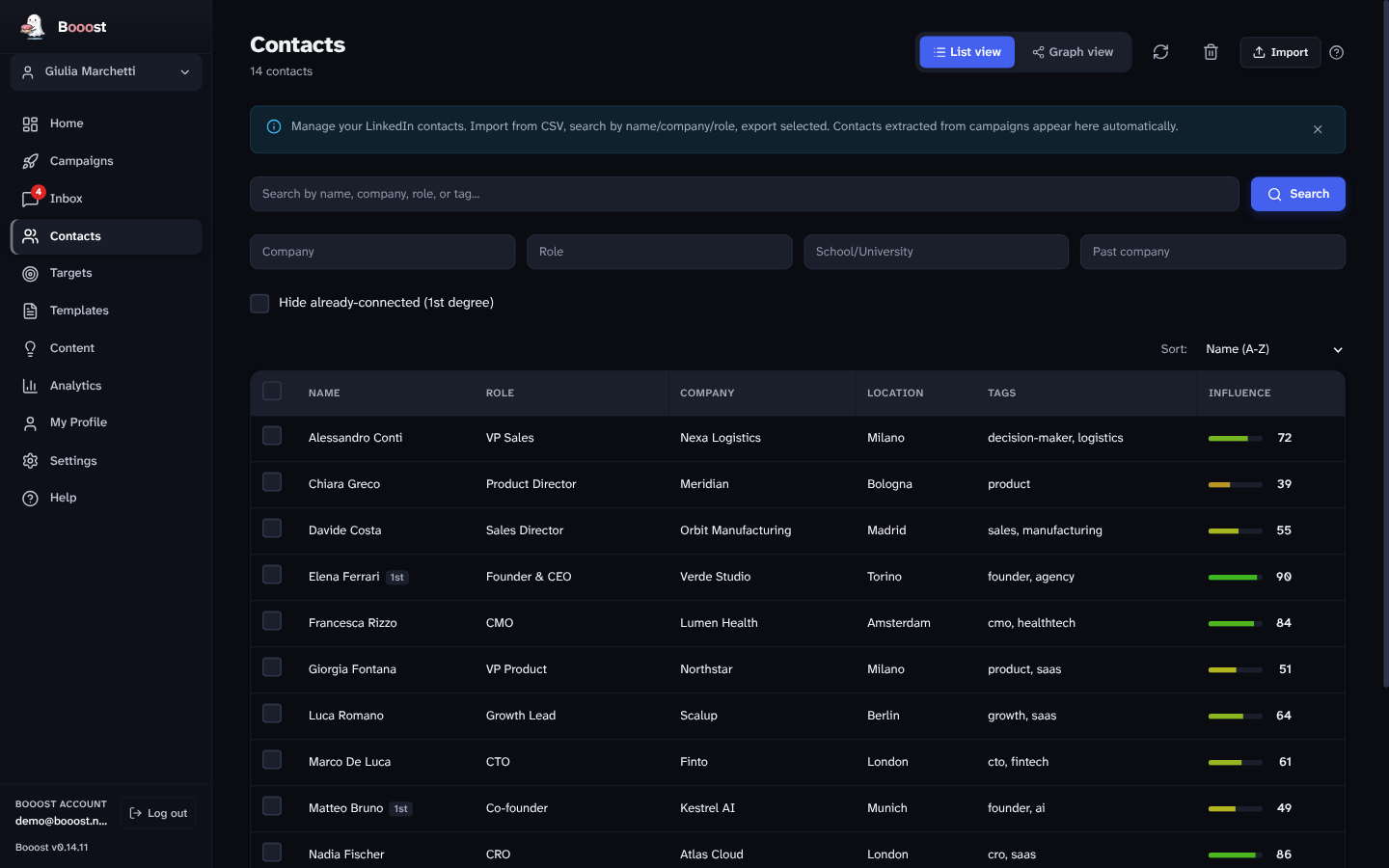
Your whole network, scored and sorted

Every contact in one searchable list with role, company and an influence score you can sort by. Tag, filter and surface the warmest people to act on first — across every account you run.

Contacts list with influence scoring
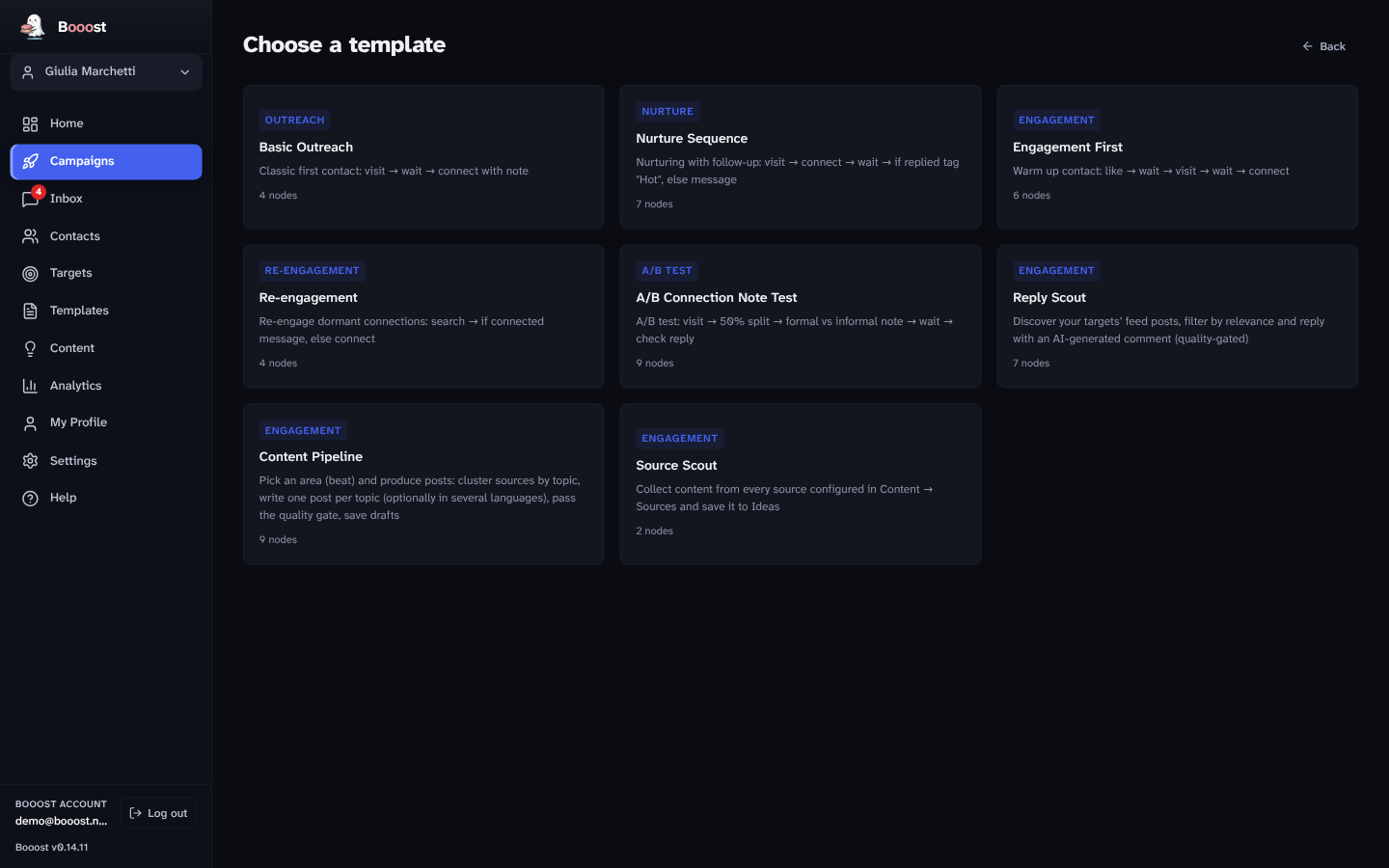
Start in minutes

Proven plays, ready to run

Eight templates cover the common plays: basic outreach, nurture sequences, engagement-first, re-engagement, A/B note tests, plus reply and source scouts. Pick one, tweak the copy, launch.

Campaign template gallery
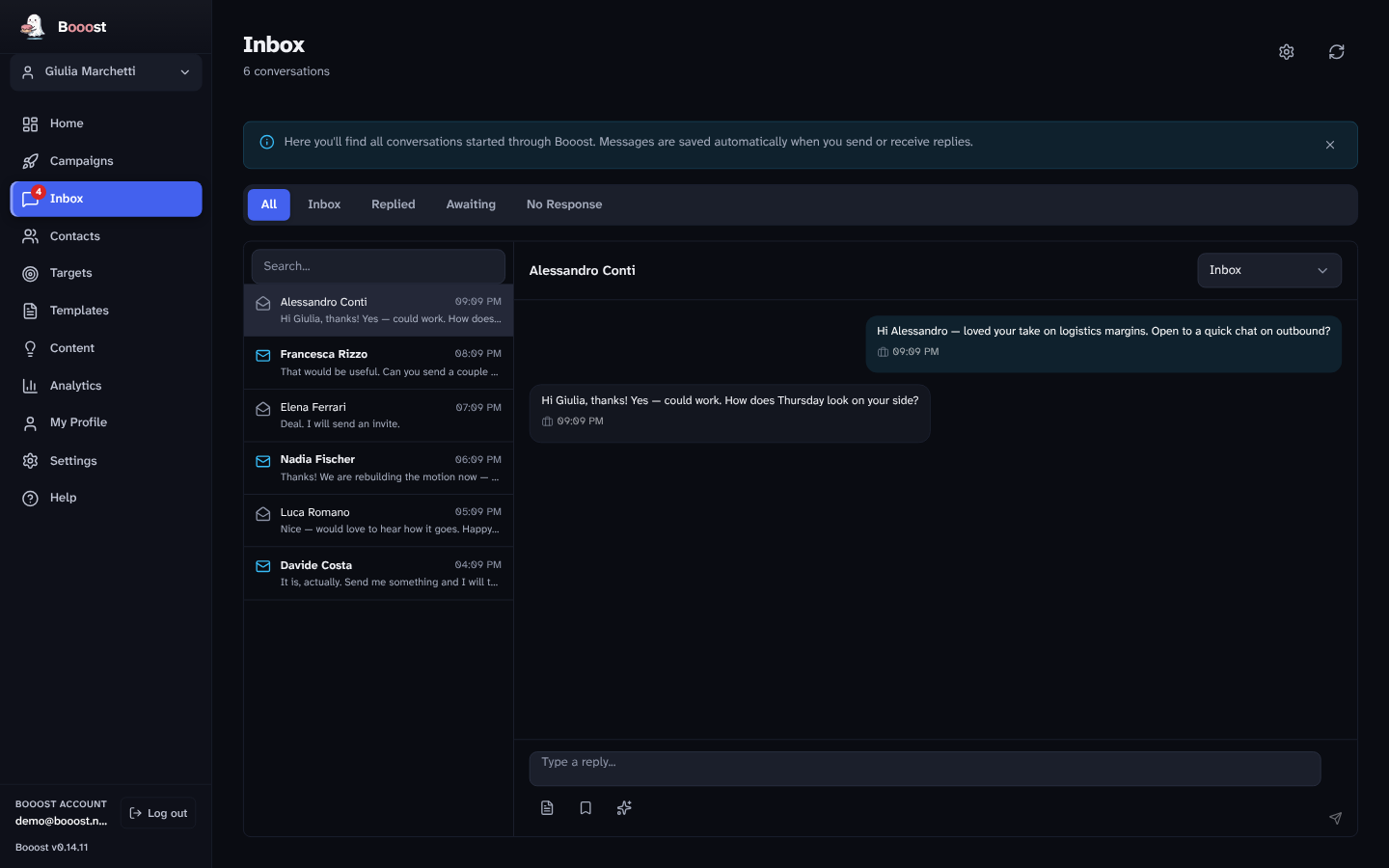
Conversations

Every reply, answered in your voice

Your LinkedIn messages, synced and sorted by intent. Draft on-brand replies in one click, grounded in the profile and voice you set once — no more cold, generic threads.

AI-assisted inbox
Your voice, captured once

Set up the brain in two minutes

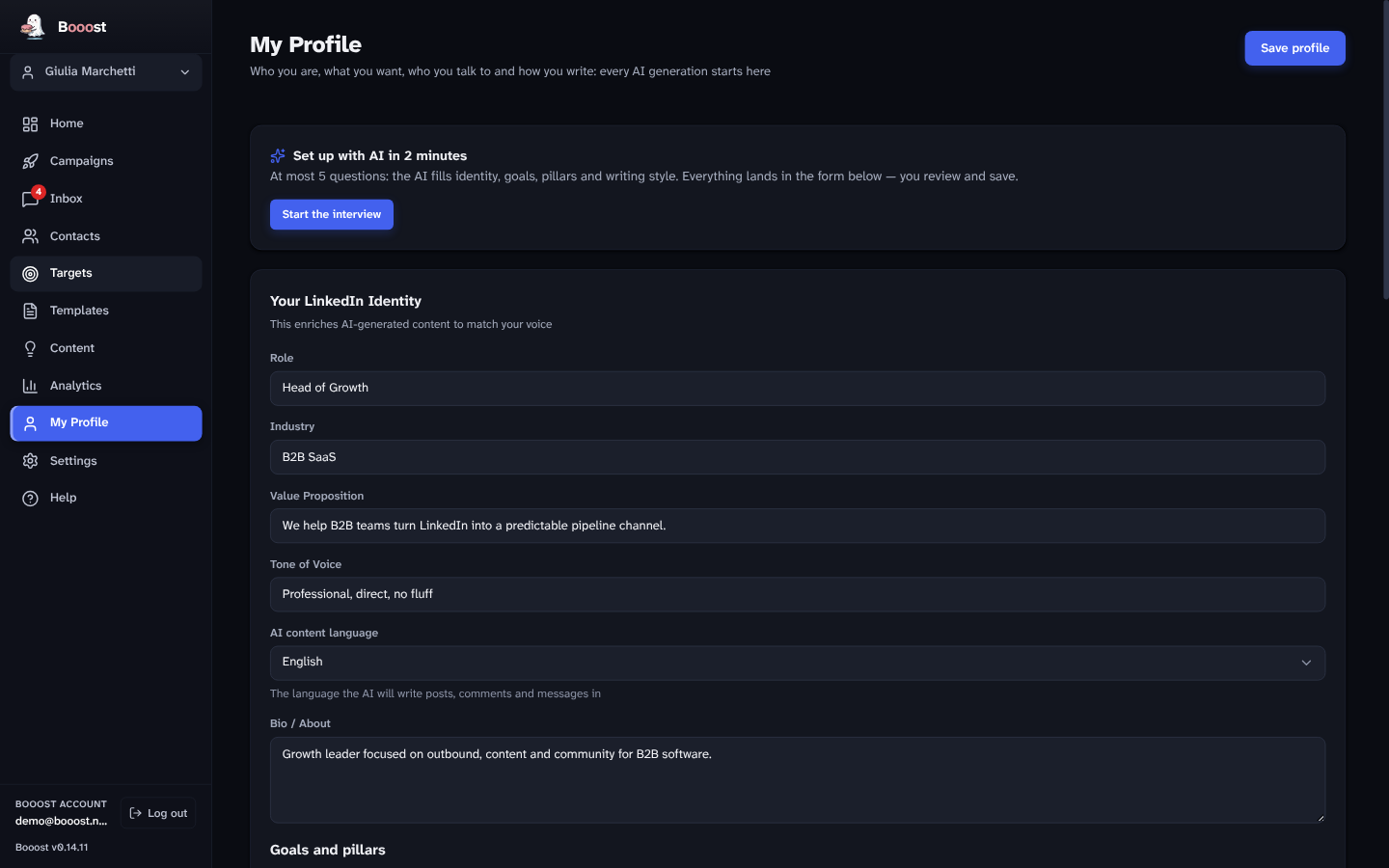
A short AI interview fills in each leader's role, goals, target audience and writing voice. Every post, comment and reply the app generates is grounded in it — so the output sounds like them, not a robot.

My Profile and AI interview setup
Everything in the box

Sixteen tools in one desktop app

Contact radar

Six axes, with the evidence behind every score.

Affinity targets

Track how warm a relationship really is, 0–100.

Network graph

See connections by company, school and shared theme.

Visual workflows

Drag-and-drop campaigns with branching and delays.

AI campaign builder

Describe a goal in plain English, get a ready workflow.

Multiple accounts

Manage every exec or client account from one desktop.

Editorial approval

Nothing publishes until a human signs it off.

Editorial pipeline

Draft → review → approve → schedule → publish.

Post from a link

Paste a URL, get a post draft in your voice.

Reply scout

AI comment drafts on your targets' best posts.

Content sources

RSS and JSON feeds wired straight into workflows.

AI inbox

Synced threads with intent badges and reply drafts.

Analytics

Funnels, A/B tests and activity trends per campaign.

20 AI providers

Bring your own key. Route each task to a different model.

Import / export

CSV in, CSV or JSON out. Your data stays yours.

Local-first

All data in SQLite on your machine. No cloud.

Reputation, protected

Built to protect every account, not just scale them

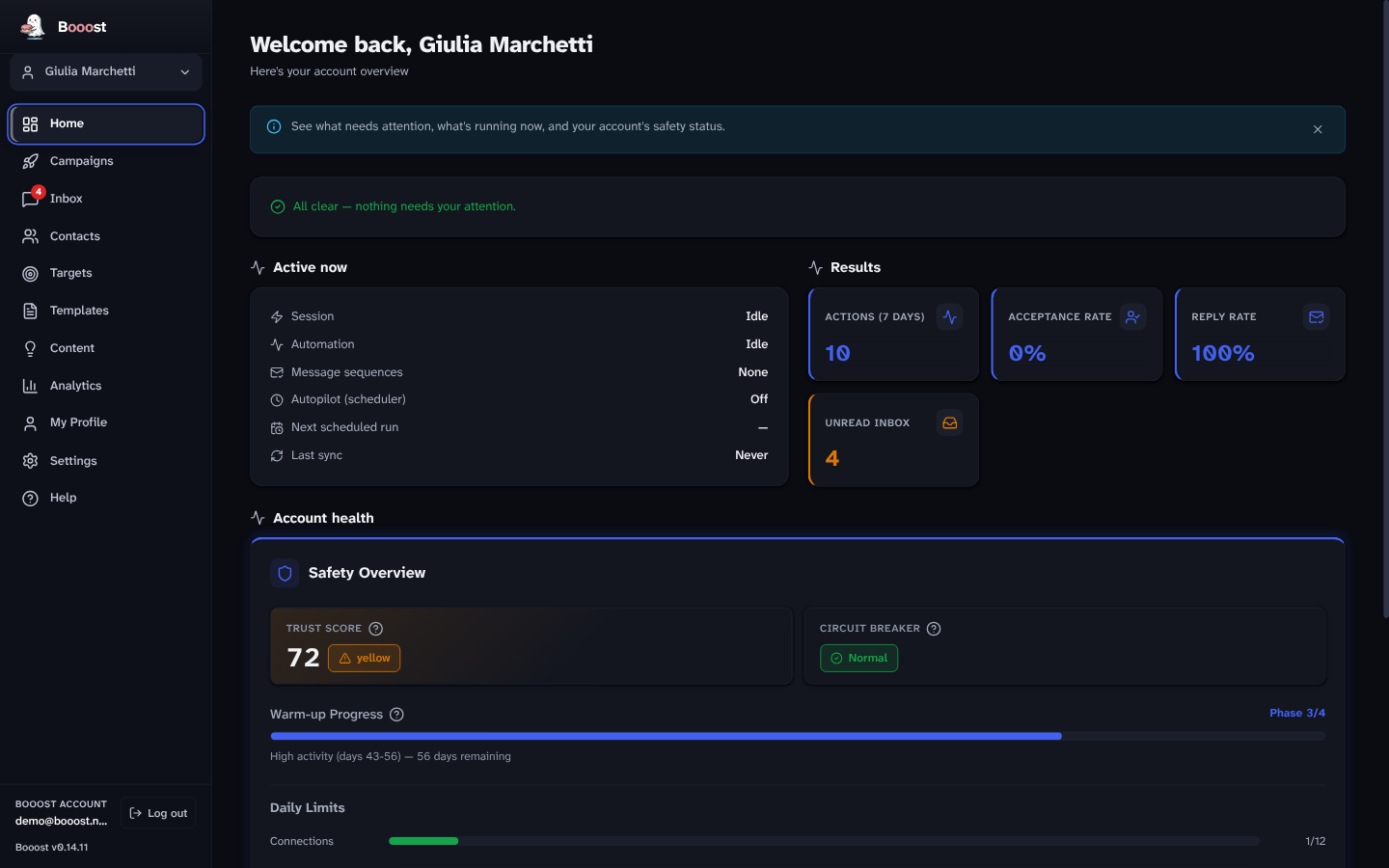
A live trust score watches each account's health. A circuit breaker pauses the moment a risk signal appears. A graduated warm-up raises limits over weeks, not minutes. Your executives' and clients' reputations are the point — never the price of scale.

Safety dashboard with trust score and warm-up
Getting started

How it works

1

Set up your profile & targets

A two-minute AI interview captures your voice. Pick the audience you want to reach.

2

Build or pick a workflow

Drag nodes onto the canvas or start from a template. The safety system handles the pacing.

3

Run it on autopilot

Campaigns execute and auto-pause on reply. You review the drafts and close.

Local-first by design

Your data, and your clients', never leave the machine

Every profile, message and campaign lives in a local SQLite database on your computer. Your data stays yours: bring your own AI key, and export everything as CSV or JSON whenever you want.

Pricing

One plan, everything included

Every tool included. Pay only for the LinkedIn accounts you manage.

Business 30-day free trial
€79/month per LinkedIn account
  • All 16 desktop tools
  • Multi-account management
  • 20 AI providers — bring your own key
  • Anti-ban safety system
  • Editorial pipeline & AI inbox
  • Local-first — your data stays yours
  • Priority support during the beta
Request early access

Free trial on your first account. Billed monthly via Stripe; manage or cancel from the billing portal.

FAQ

Frequently asked questions

What is contact intelligence?

Booost scores every contact on a six-axis radar — Thematic fit, Seniority, Activity, Target fit, Influence and Proximity — and shows the evidence behind each number. Add someone to your targets and an affinity score tracks how warm the relationship is, rising with real interactions and cooling with silence.

Is LinkedIn automation safe with Booost?

Yes. Booost Business is designed around safety as a core feature, not an afterthought. The system starts with conservative daily limits and gradually increases them over an 8-week warm-up period. If any risk signal appears — such as a CAPTCHA, rate limit, or unusual response — automation pauses automatically until the account is healthy again. You don’t need to monitor it manually.

What AI providers does Booost support?

Booost Business supports 20 AI providers with a bring-your-own-key model. This includes Anthropic (Claude), OpenAI-compatible endpoints (Groq, Mistral, Cerebras, Together and more), Google AI Studio, Perplexity, and others. For fully offline operation, Booost integrates with Ollama to run local models with automatic detection. Route each task — posts, comments, replies, analysis — to a different provider. Zero vendor lock-in.

Is my data stored in the cloud?

No. Booost Business stores all data locally in a SQLite database on your machine. Profiles, messages, campaign data, and activity logs never leave your computer. You can export any data as CSV or JSON at any time through the built-in export manager. This is especially important for agencies handling client data under privacy regulations.

What is the difference between Booost Personal and Business?

Booost Personal is a Chrome extension for individuals who want AI-generated LinkedIn comments. Booost Business is a desktop app for growth teams and agencies that need the full workflow: a six-axis contact intelligence radar, multi-step campaign sequences, an editorial content pipeline, an AI inbox, and enterprise-grade anti-ban safety. Both support 20 AI providers with bring-your-own-key.

Is Booost accessible?

Yes, and we can prove it. Every screen is audited against WCAG 2.2 AA with axe-core, in both light and dark themes, on every release, with AAA-level text contrast where practicable. Full keyboard navigation, visible focus states and screen-reader labels throughout. Accessibility here is a test that has to stay green before we ship, not a badge. Few LinkedIn tools even run the audit.

Request early access

We onboard teams in small batches during the beta.

Beta seats are limited. Early access includes direct support.