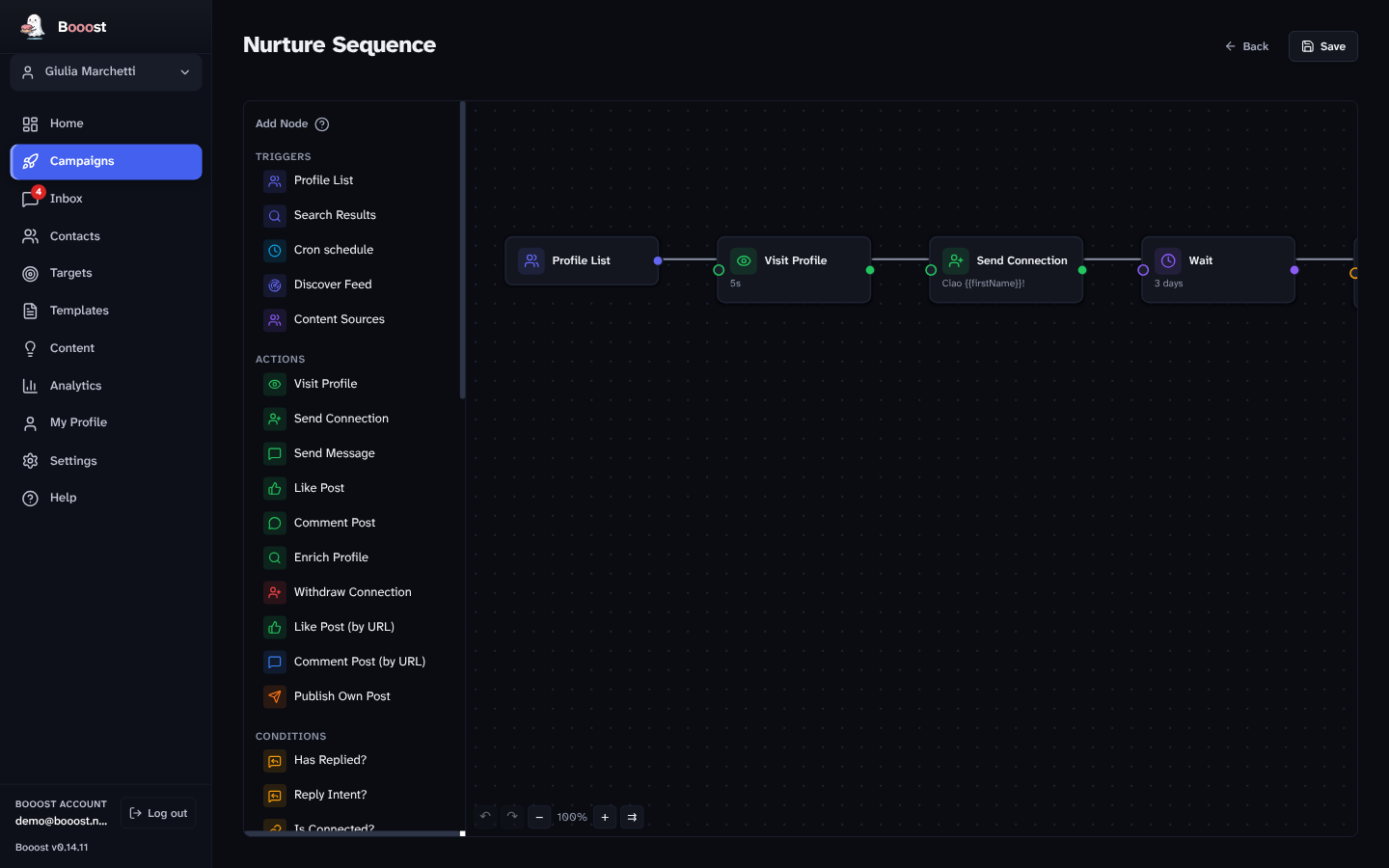
Why a canvas and not a list of steps
Because outreach is not a list of steps. It branches: if they accept, wait two days and say this; if they reply, stop everything; if they don't accept in a week, try a different angle. Written as a linear sequence with settings, that logic becomes invisible — and invisible logic is how people end up sending things they would never have approved.
On a canvas you can point at the box that is about to run.
The eleven plays in the box
Use them as they are, or open one and take it apart. They are the fastest way to see what the canvas can do.
| Play | What it does |
|---|---|
| Basic Outreach | the classic first contact: visit the profile → wait → connect with a note |
| Nurture Sequence | stay useful over weeks before asking for anything |
| Engagement First | react and comment on their posts before the connection request |
| Re-engagement | wake up contacts who went quiet, without repeating the old message |
| A/B Connection Note Test | the same audience, two notes, and the acceptance rate decides |
| Reply Scout | watch for replies and route them by intent |
| Content Pipeline | sources → draft → review → schedule → publish |
| Blog → LinkedIn Page | a feed item becomes a Page post, with a summary you approve |
| Watch an account (X) | whenever an account you follow closely posts, like it — never the same post twice |
| Follow-back (X) | follow back the people who started following the channel, at the channel's pace |
| Bridge from your LinkedIn Page to X (X) | a post of your Page becomes a post on X, with a text you approve |
Four of the LinkedIn plays — Basic Outreach, Reply Scout, Content Pipeline and the Page bridge — carry a channel field: pointed at X they publish, reply and follow there; the connection request becomes a follow, and there is no message step, because X has no direct messages in Booost.
What you can put on it
- Triggers — a target list, a search, the discover feed, a schedule, or an incoming reply.
- Conditions — connection degree, qualification band, whether they replied, whether a previous step succeeded, reply intent.
- Actions — profile visit, connection request with or without a note, message, reaction, comment, comment on a post by URL, repost, publish, and the Page equivalents.
- A/B splits — send the population down two branches and let the numbers settle the argument.
- Waits — in hours or days, and always inside the account's operating hours.
The three things that stop a campaign
1It pauses itself when someone replies
The moment a prospect answers, the sequence stops for that person and hands you the conversation. This is not a setting you enable — it is how sequences work. Nothing reads as more automated than a follow-up that ignores the reply directly above it.
2A person can refuse any action
Every action a campaign wants to take can be vetoed before it happens. The AI inbox drafts replies rather than sending them, and the content pipeline waits for approval before publishing.
3The safety system outranks the campaign
Daily ceilings, the warm-up ramp, human pacing and the circuit breaker sit underneath every campaign. A sequence that wants to send forty connection requests today will send ten, because the ceiling is not a campaign setting — it is the safety system, and campaigns do not get to argue with it.
No two messages may look alike
This one is worth knowing because almost nobody builds it.
Before a generated message is allowed out, Booost compares it against the last 50 messages sent from that account. If the similarity is above 0.85, the message is refused and has to be regenerated with structural variation — not a synonym swap.
The reason is both decency and safety. A hundred near-identical messages is the single most legible bot signature there is, and it is also just rude. The check is what stops "personalisation" from meaning nothing more than a swapped first name.
Running many of them
Campaigns belong to an account, and each account has its own limits, warm-up state and analytics. On a desktop managing twenty accounts, twenty campaigns run under twenty separate safety budgets — nothing is pooled, because the risk is not pooled either.
⚠️ One known gap: two admins of the same Company Page running the same workflow each act under their own account, and the Page has no shared memory of it — so the same action can go out twice. Tracked as #278.
What campaigns will not do
- They do not run when your computer is off. Booost is a desktop application; scheduled work resumes when it comes back.
- They do not source strangers. Campaigns act on the network your accounts have and on searches you define — there is no lead database behind them.
- They do not send email, SMS or WhatsApp. LinkedIn and X only.
- On X, they do not send direct messages. The canvas publishes, replies, quotes, reposts, likes and follows there; messages stay a LinkedIn thing.
- They do not make automation compliant. LinkedIn's §8.2 prohibits it wherever it runs, and X's automation rules say the same of its website; see the acceptable use policy.
Which editions have it
Basic and Pro. The canvas, the eleven plays, the A/B splits and the uniqueness check are in both. Pro adds the source-driven nodes — the content factory and the quality gates — because those run on the managed tier. Community publishes only and has no campaigns at all.
Questions this page gets asked
Can I edit a play instead of building from scratch? That is what they are for. Open one, change the waits and the copy, save it as your own.
What happens if a step fails? The failure is recorded on that contact and the branch stops there — it does not silently carry on as if the step had worked.
Can a campaign act as a Company Page? Yes. Publishing, commenting and following can run as the Page rather than as you.
How do I know what a campaign actually did? Analytics are per account, and every attempted action is recorded with its outcome — see the inbox for the conversations it produced.